Existing customer? Sign in
Management by Exception in Floware: Monitor everything automatically. Surface the things that deviate from normal.

Every midsize manufacturer and distributor has the same problem, and almost none of them name it correctly.
It is not a data problem. You have plenty of data. Your ERP is full of it. Your warehouse is generating it. Your production floor is swimming in it.
The problem is attention. You do not have enough of it, and the things competing for it are not competing fairly.
A late purchase order that will shut down your production line next week is competing for your attention with a routine stock adjustment. A customer order sitting untouched for three days is buried under the same dashboard as orders that are moving normally. A goods receipt that came in 20% short is mixed in with receipts that arrived complete.
Everything looks the same until something breaks. And by then, you are in reactive mode. Fighting fires. Apologising to customers. Expediting at premium cost. Wondering how nobody saw this coming.
Management by exception is the discipline of making your system do the watching, so you can do the thinking. It is not new. Frederick Taylor wrote about it in 1903. What is new is that the technology to do it well is no longer reserved for enterprises with seven figure IT budgets.
What Management by Exception Actually Means
The idea is simple. Set clear thresholds for what "normal" looks like. Monitor everything automatically. Surface only the things that deviate from normal. Let your team focus on those.
That last part is where most businesses fail. They collect data, build dashboards, even set up alerts. But the alerts go to email inboxes that are already overflowing. The dashboards require someone to remember to look at them. And the thresholds, if they exist at all, were set once and never revisited.
What you end up with is passive exception management. You find out about problems after they have already cost you money, time, or a customer relationship.
Active exception management is fundamentally different. The system watches continuously. It evaluates every event against defined rules. When something crosses a threshold, it creates a flag with context: what happened, why it matters, and what to do about it. That flag appears in front of the right person at the right time, with the tools to act on it immediately.
The research backs this up clearly. Active monitoring produces 15 to 25% improvements in forecast accuracy. It compresses decision making time from days to hours. Companies using structured exception management have reduced time to resolve supply chain incidents by as much as 65%.
But here is the number that should matter most to you: a 66% reduction in administrative work. That is not a productivity metric. That is time returned to your leadership team. Time to think strategically, visit customers, develop people, and plan growth rather than chasing problems that a system should have caught.
What Floware Does About It
Floware ships with a complete exception management framework built into the core of the system. It is not a bolt on module or a reporting add on. It is woven into the operational fabric of every transaction.
Automatic Detection
The system monitors your operations through two mechanisms. Reactive rules evaluate events as they happen. When a goods receipt comes in short, when a discount on a sales order exceeds your threshold, when stock goes negative, the system evaluates the event against your rules in real time and creates an exception immediately.
Scheduled rules run on a regular cycle, scanning for conditions that develop over time. Purchase orders that are overdue. Sales orders that have gone stale. Quotes that expired without follow up. Stocktakes that are taking too long. These are the slow moving problems that erode your business quietly because no single event triggers an alarm.
Each exception is created with three things: what happened, why it matters, and what to do about it. This structured description means the person receiving the exception does not need to investigate before deciding whether to care. The context is right there.
Your business is unique — your software should be too. Let's talk about a system built around how you actually work.
Book a free demoSeverity and Prioritisation
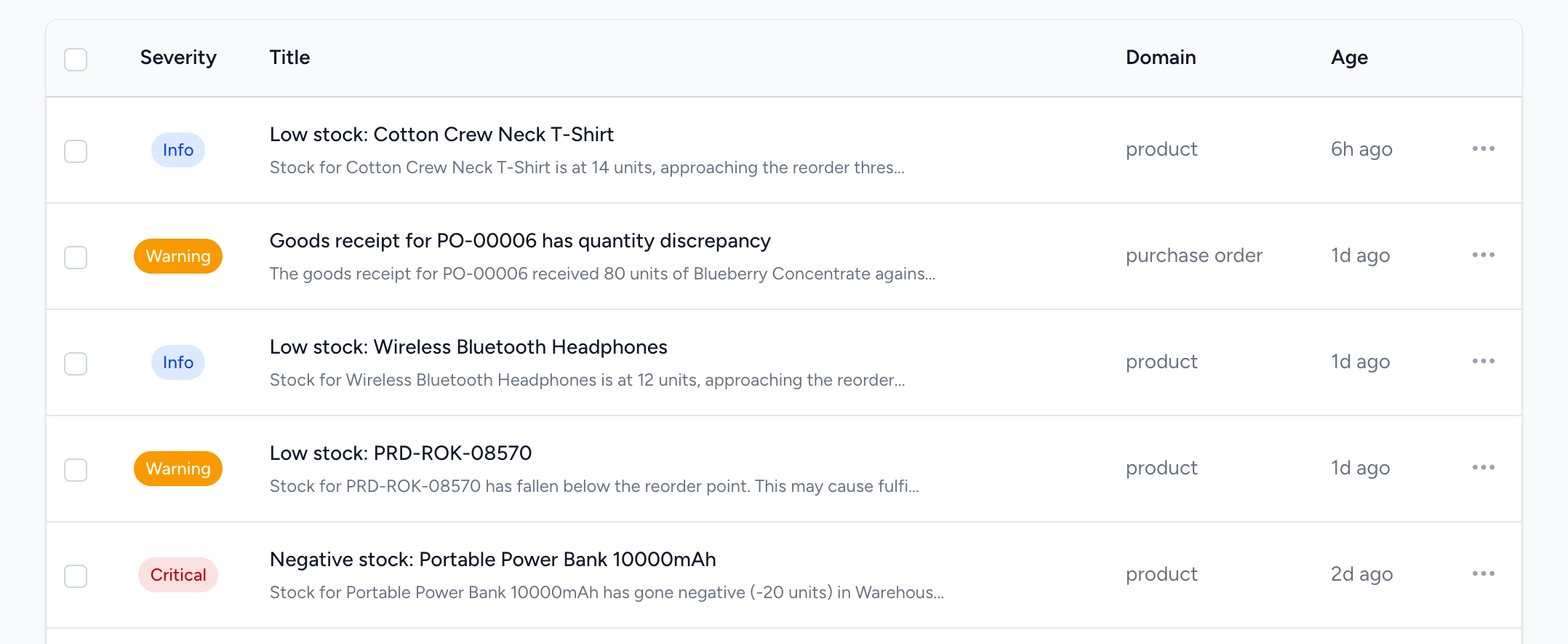
Not every exception is equal, and the system does not pretend they are. Exceptions are classified as critical, warning, or informational. A purchase order that is seven days overdue is more urgent than one that is three days late. Negative stock is more severe than low stock.
This severity classification drives everything downstream. Critical exceptions appear with red indicators. They push to the top of every list. They trigger immediate email notifications to the right people. Warning level exceptions are batched into daily digests. Informational exceptions are logged but do not interrupt anyone's day.
The result is a system that respects your attention. It does not cry wolf. When it asks you to look at something, it has earned the interruption.
A Triage Inbox That Works Like Your Email
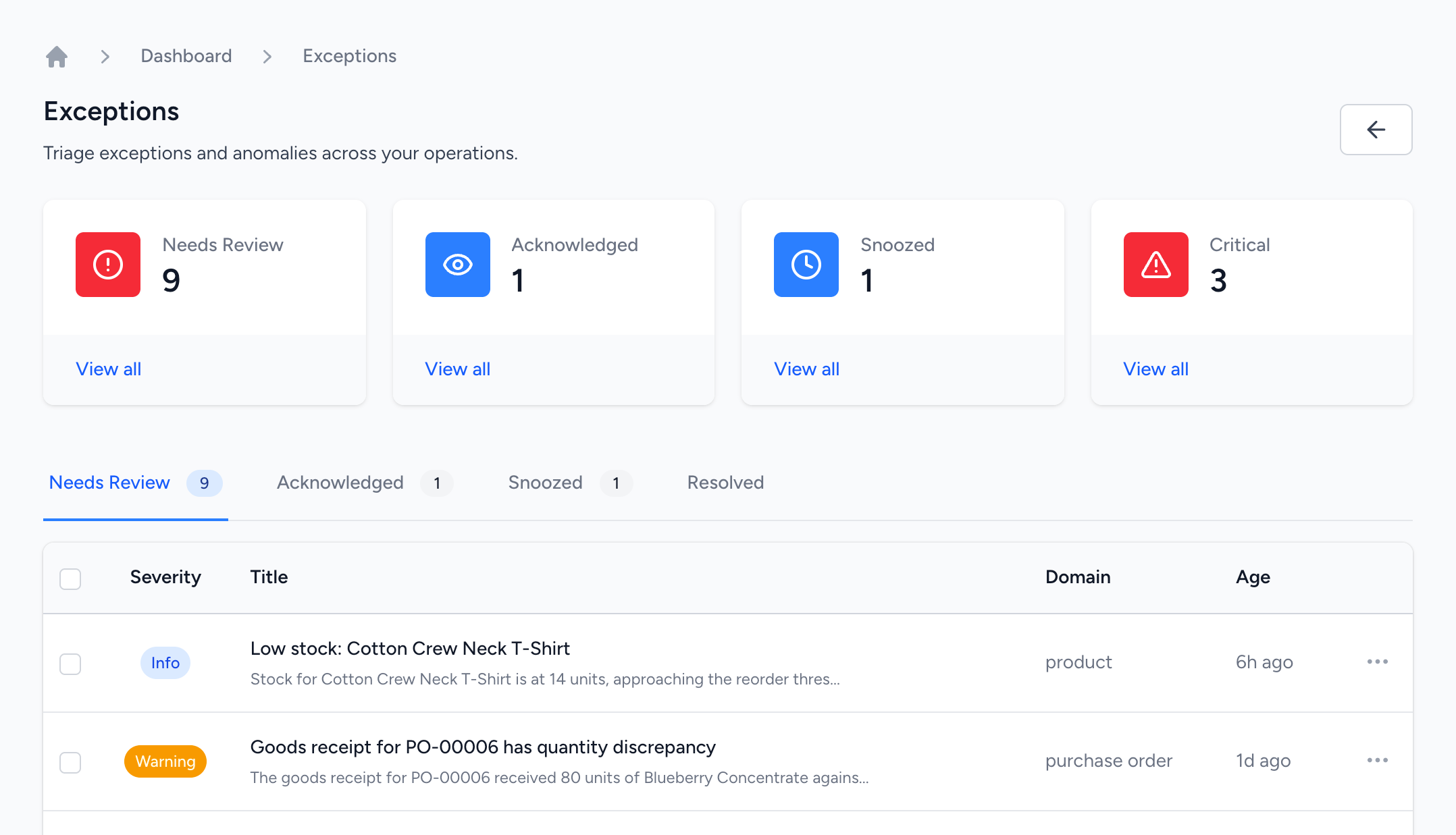
Every exception in the system flows into a triage inbox that is designed for rapid processing, not just viewing. Think of it as your operational inbox.
The inbox is organised into tabs: items that need review, items that have been acknowledged, items that are snoozed, and items that have been resolved. Each tab shows a count so you know at a glance where your backlog sits.
From the inbox you can acknowledge an exception with a single click (telling your team you have seen it and are working on it), snooze it until a specific date (because you know the supplier is delivering next Tuesday), resolve it with notes (documenting what you did), or dismiss it with a reason (marking it as a false positive, accepted risk, or duplicate).
Bulk actions let you process multiple exceptions at once. When a supplier finally delivers and clears five overdue purchase order exceptions simultaneously, you select them all and resolve them with a single shared note.
Exceptions Surface Where You Work
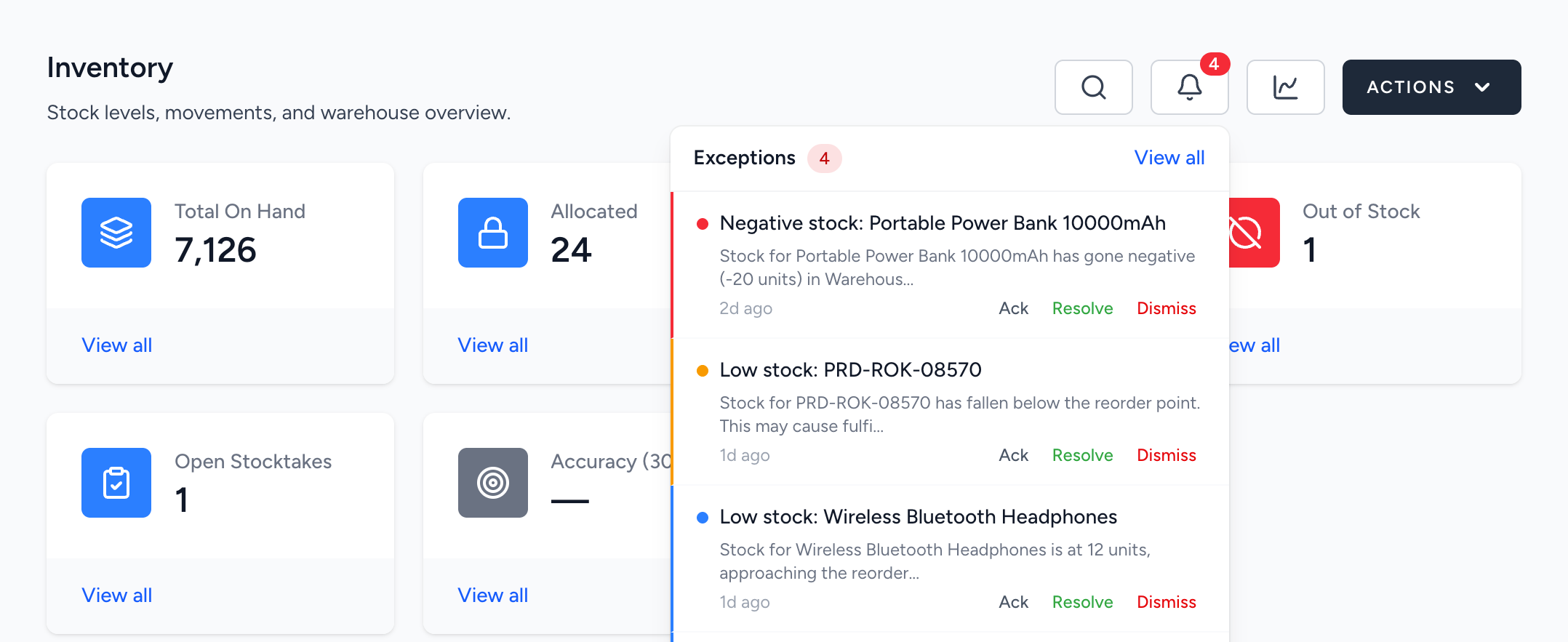
You should not have to navigate to a separate screen to find out something is wrong. In Floware, exceptions appear exactly where you are already looking.
Every module dashboard has a bell indicator that shows how many active exceptions exist for that area. Click it and a dropdown shows you the exceptions right there, with severity indicators, descriptions, and action buttons. Acknowledge, resolve, or dismiss without leaving the page you are working on.
On individual records like purchase orders, sales orders, and products, exception banners appear between the heading and the detail card. If a purchase order is overdue, you see it the moment you open that purchase order. Not in a separate report. Not in an email you might miss. Right there, in context.
Each exception also has its own detail page with the full description, metadata, a complete audit trail showing every state change, and a comment thread where your team can discuss it. This creates a documented history of how your business responds to problems, which is valuable for process improvement and, if your industry requires it, compliance.
You shouldn't need to find workarounds.
Let's build the software so you won't have to.
Notifications That Respect Your Preferences
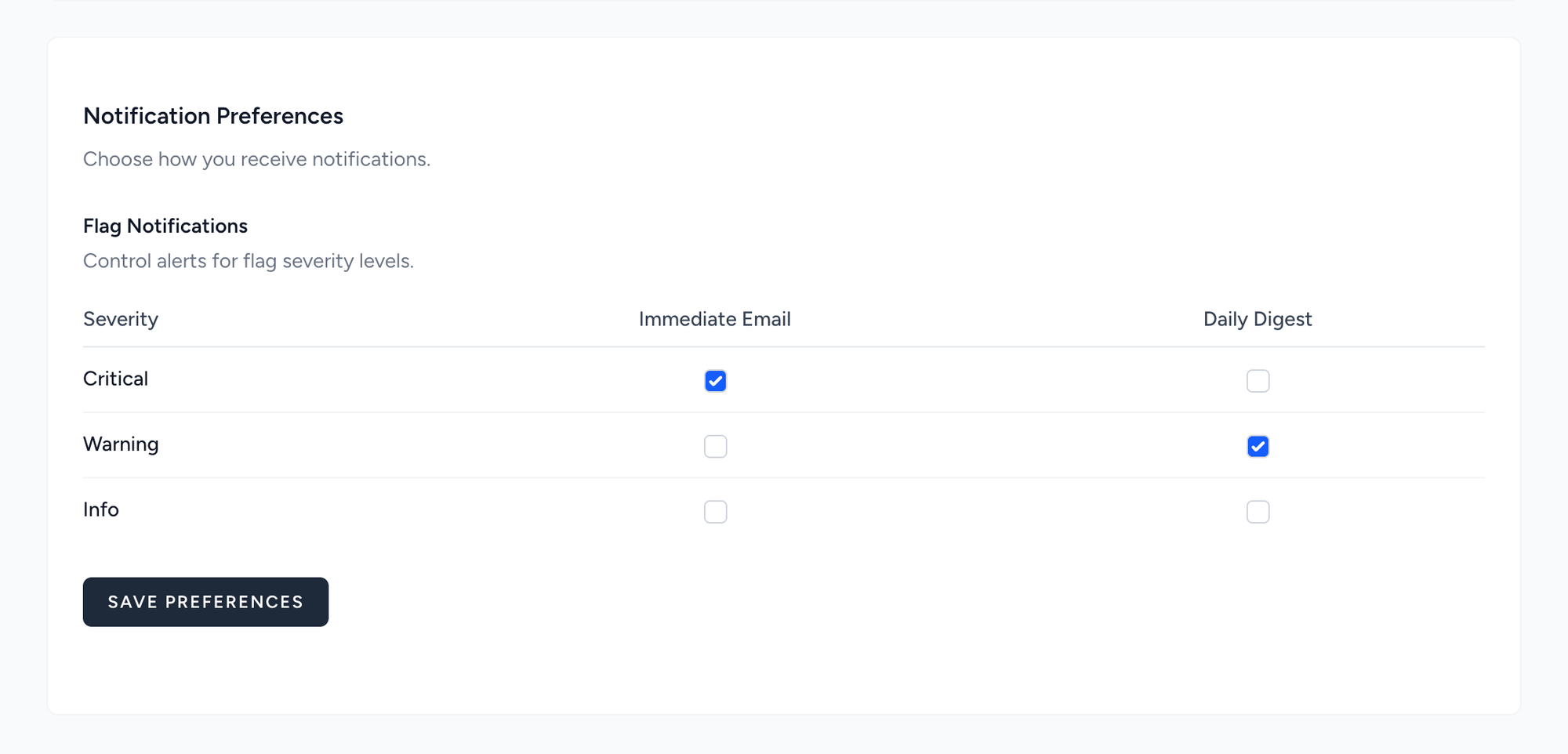
Different people need different things. Your warehouse manager wants immediate email alerts for stock exceptions. Your purchasing lead wants a daily digest of overdue orders. Your finance director does not want to hear about stock issues at all but wants every discount exception immediately.
Floware lets each user control their own notification preferences through a simple matrix on their profile page. For each severity level, they choose which channels they want: immediate email, daily digest, both, or neither. The system applies sensible defaults so new users get useful notifications without any setup, but everyone can tune it to match how they actually work.
Analytics That Tell You Whether Your Rules Are Working
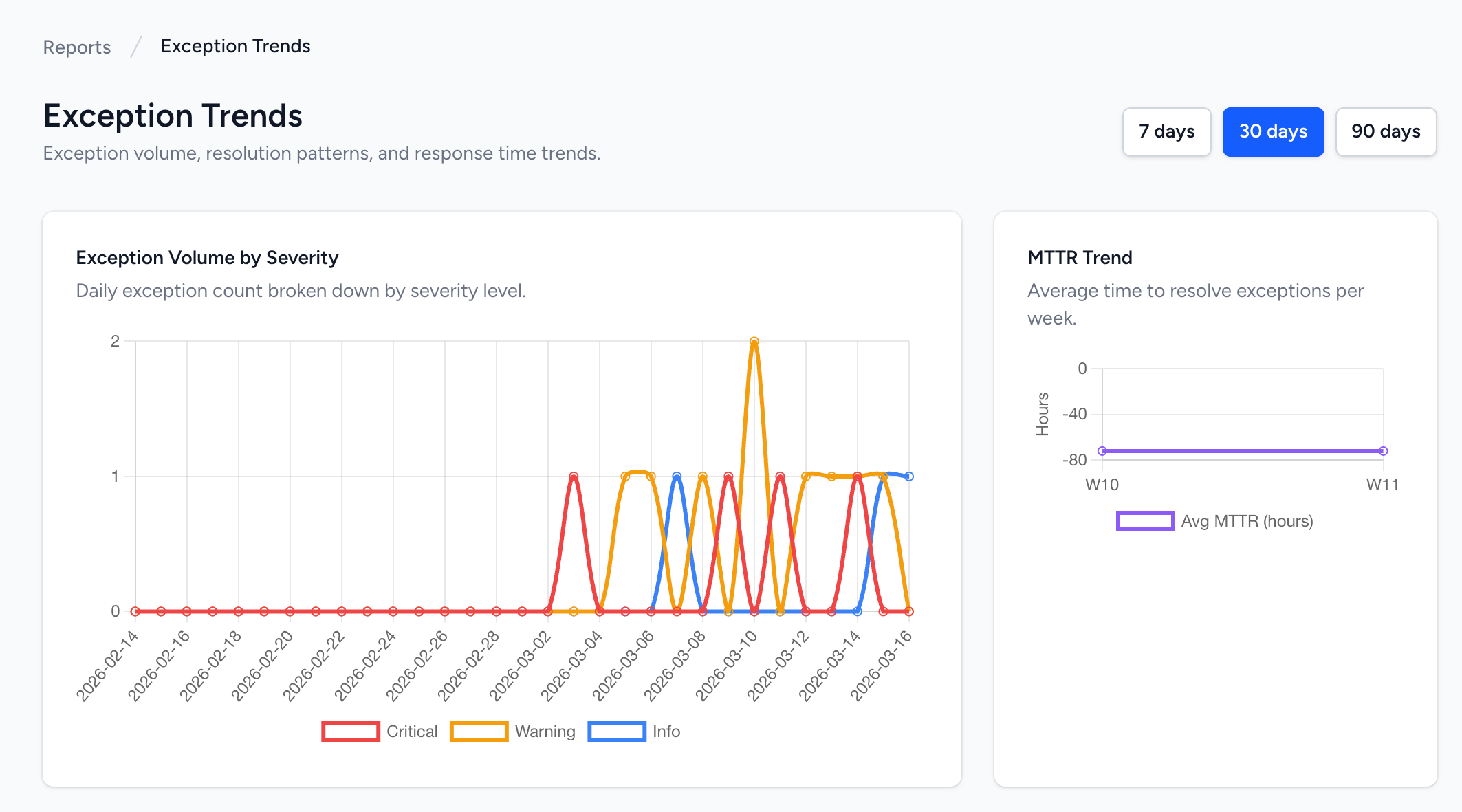
The exception framework is not just about catching problems. It is about learning from them.
The Alert Quality report shows per rule metrics: how often each rule fires, what percentage of exceptions are acted on versus dismissed, the false positive rate, and the average time it takes your team to respond and resolve. If a rule fires constantly and gets dismissed 80% of the time, that is a noisy rule that needs tuning. If another rule fires rarely but takes three days to resolve, that is a process bottleneck worth investigating.
The Trends report shows flag volume over time, broken down by severity and rule. You can see whether your exception count is trending up or down, whether resolution times are improving, and which rules generate the most work. These are the metrics that tell you whether your operational health is improving or deteriorating, which is exactly the kind of strategic insight that midsize business owners need but rarely have time to dig for.
Why This Matters for Your Business
If you run a midsize manufacturing or distribution company, you know the feeling. You are pulled in every direction. You are the tiebreaker, the escalation point, the person who makes the final call on too many things. Your team is capable, but the systems they work with do not help them distinguish between what is routine and what genuinely needs attention.
Management by exception is not about working less. It is about working on the right things. It is the discipline of saying: the system watches everything so that I only look at what matters.
The businesses that implement this well see measurable results. Faster response to supply chain disruptions. Fewer stockouts. Fewer customer complaints about late deliveries. Less time spent in status meetings reviewing data that a dashboard could have shown. More time spent on the decisions that actually move the business forward.
And perhaps most importantly, your team develops confidence. When front line employees know the system will catch problems and route them appropriately, they spend less time worrying about what they might be missing and more time doing their jobs well. When managers know they will be alerted to genuine exceptions, they can delegate routine operations with confidence rather than hovering.
This is what technology should do. Not generate more reports for you to read. Not create more dashboards for you to check. But watch your business continuously, learn what normal looks like, and tap you on the shoulder only when something deserves your attention.
That is what Floware's exception management does. And it ships out of the box.
Run your business, your way.
Your business is unique, but your software is off the shelf? Ditch the workarounds and let's build your ERP systems to fit your teams.